A JSON data API bridges the gap between your application and live, current information — delivering structured responses that software can consume directly, no manual conversion needed. For B2B products, this means pulling public professional profiles or company details the moment you need them, powering enrichment, matching, and automation with fresh records every time.
Table of Contents
How JSON Data APIs Actually Work
Picture a restaurant counter. Your application walks up and places an order. The service behind the counter prepares exactly what you asked for and hands it back in a predictable, well-organized package. JSON keeps that package lightweight, human-readable, and trivially easy for JavaScript, Python, and just about any modern language to parse.
A typical request might hand over a professional profile URL or a company domain. The response comes back with nested objects — roles, locations, firmographics, contact fields — all logically grouped together. That nested structure shines when a single record holds multiple layers of related detail that would get messy fast in a flat spreadsheet.
This is where it pulls away from older approaches. A CSV download dumps a static file on your team and hopes nobody notices when it goes stale. SOAP wraps every message in XML overhead that nobody enjoys parsing. JSON APIs skip both headaches. ServiceNow's platform, for example, supports one-time imports and recurring scheduled pulls through JSON endpoints, while Astro's content documentation walks through how remote structured data can be loaded, validated, and queried directly inside an application.
A JSON data API is not just a file format. It is a live delivery mechanism — software asking for exactly what it needs, exactly when it needs it.
The full request and response cycle tends to follow four steps:
- Send — Your application calls an endpoint with an input value and your authentication token.
- Fetch — The professional data API locates and extracts the relevant public information.
- Parse — Your system reads the JSON fields and maps them into your own internal data model.
- Act — A CRM record updates, a lead score recalculates, a workflow triggers, or a UI reflects the new data.
This pattern lets you do real-time enrichment without maintaining a tangle of separate data pipelines. If you want to get more familiar with the types of company attributes involved, this overview of firmographic data covers the key fields.
One thing worth flagging early: because responses can include personal or company-specific information, engineering teams should always review a provider's policies before pushing to production. Take a moment to browse the privacy details and understand what you're working with. The strongest integrations are built on three things — a stable schema, clear field definitions, and responsible data handling from day one.
Match Delivery to User Expectations
The right delivery pattern decides whether a feature feels immediate or delayed. A synchronous JSON data API keeps the user waiting for one result, while an asynchronous workflow accepts the request, processes it separately, and returns the result later.
Think of synchronous delivery as ordering coffee at a counter. It fits profile enrichment during signup, where the application needs a current role or company before the next screen loads. Fetchin provides synchronous responses by default, with median response times around one second, making short, user-facing requests practical.
Asynchronous delivery works more like placing a catering order. It suits large batches, high-latency requests, and background jobs where users do not need an answer immediately. For example, a sales platform could submit thousands of company URLs overnight, then import completed JSON results into its CRM the next morning.
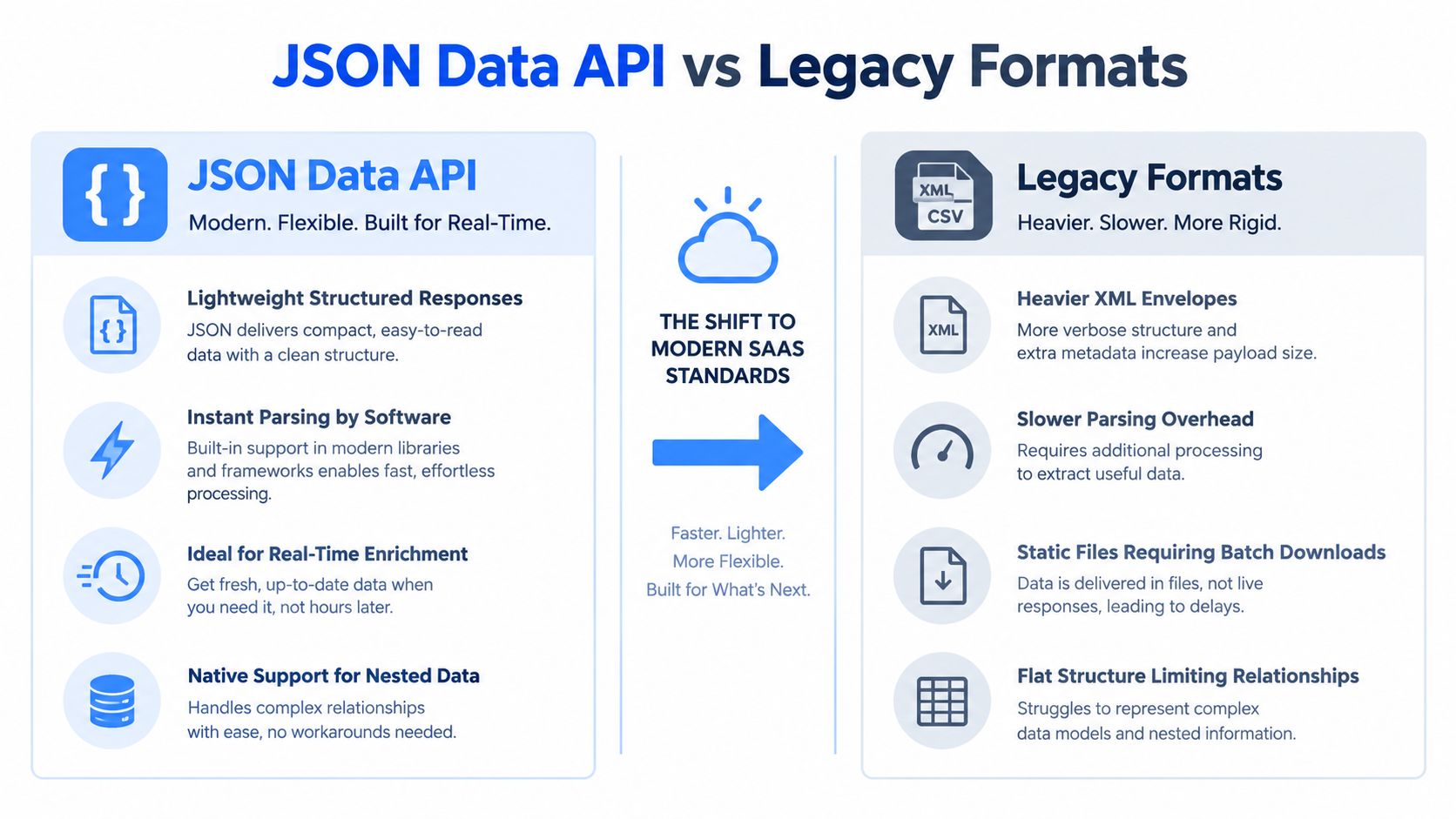
This visualization contrasts lightweight JSON responses with heavier XML envelopes and static CSV files, highlighting why nested JSON fits real-time enrichment and software-driven workflows.
Integration Pattern Comparison
Choosing between these two approaches depends on what your application actually needs at any given moment. Here is how they stack up:
| Pattern | Response Time | Best Use Case | Cost Efficiency |
|---|---|---|---|
| Synchronous | Immediate | Signup enrichment, live search, validation | Efficient for small requests |
| Asynchronous | Delayed | Batch enrichment, reports, large workflows | Efficient at high volume |
In practice, many teams run both patterns side by side, reserving synchronous calls for moments where a human is waiting and asynchronous jobs for everything else.
Choosing the Right Pattern
Choose synchronous processing when the result directly controls the next action. A recruiting interface might fetch a professional profile during review, then show current positions, education, skills, and locations without requiring a separate refresh.
Choose asynchronous processing when completeness matters more than instant feedback. Batch jobs can retry individual failures, spread requests over time, and avoid forcing a user interface to hold an open request.
Use synchronous calls for decisions happening now, and asynchronous jobs for work that can safely finish later.
Handling Rate Limits and Errors
Rate limits matter in both patterns. Fetchin supports 5 requests per second on self-serve plans and up to 100 requests per second with dedicated capacity. A queue, concurrency limit, and measured backoff help prevent burst traffic from triggering throttling.
Start with a modest request rate, inspect response headers, and increase concurrency gradually. Keep separate queues for interactive and batch traffic so a large import cannot slow down signup requests.
For a deeper dive into when each pattern makes sense, read this guide to synchronous and asynchronous API patterns. Before launching to production, define timeout limits, retry only temporary failures, and record a job identifier for asynchronous results. This keeps the integration observable without adding unnecessary machinery.
A secure JSON data API starts with one straightforward rule: pull only what your product actually needs. For professional profiles and company enrichment, that typically means publicly available information, a clear purpose, and solid controls from the initial request all the way through deletion.
Take Fetchin, for instance. Their ethical sourcing aligns with GDPR and CCPA requirements, and the API delivers live, publicly available information on demand. But here's the thing — real-time delivery doesn't shift your responsibility away. You still own the obligations around lawful processing, transparency, and sensible data retention.
Compliance isn't a box you tick at launch. It's a set of decisions your team has to carry through the entire data lifecycle.
Check the Provider Before Integration
Before plugging any professional data API into your CRM, sales intelligence tool, or AI workflow, get straight answers about how data is collected, stored, accessed, and deleted. A trustworthy vendor explains their controls in plain language — not buried in vague legalese.
Run through this checklist before committing:
- Source boundaries: Does the provider restrict extraction to public information and clearly explain how it sources data?
- Data minimization: Can you request just the fields you need instead of hoarding an entire profile?
- Retention policies: How long are responses, logs, and backups retained?
- Privacy controls: Can records be removed, corrected, or excluded when circumstances require it?
- Security posture: Are API keys protected, access roles scoped appropriately, and audit events logged?
- Subprocessors: Are hosting, storage, and processing partners openly disclosed?
Your own application needs its own guardrails too. Store credentials in server-side secrets — never in browser code — and lock down production keys by environment and role.
Build Privacy Into the Data Flow
Consent and lawful purpose should map directly to specific product actions. Consider a recruiting platform: it might log why a profile was requested, where the result appeared in the UI, and when that record should expire. Purpose gets baked into the workflow from the start.
Here's how a practical flow comes together:
- Define purpose before you request anything.
- Request the smallest useful response for that specific purpose.
- Keep temporary API responses separate from durable customer records.
- Automate retention and deletion — don't leave it to manual cleanup.
- Log access events without copying unnecessary personal fields into your observability systems.
Company firmographics — industry, headcount, revenue range — carry different risk profiles than personal contact fields, so classify them separately. This lets your team apply proportionate controls rather than treating every JSON property the same way.
Finally, review the provider's privacy details, document your decisions, and loop in legal counsel for jurisdiction-specific guidance. It also helps to choose a vendor that doesn't charge credits for failed requests. That small detail removes a lot of pressure to make repeat calls you don't actually need, which keeps operational discipline clean as your usage scales.
{ "profile": { "currentPosition": { "title": "VP of Sales", "company": { "name": "Northstar Systems", "headcount": 240 } }, "location": "Amsterdam", "skills": ["B2B sales", "SaaS"] } }
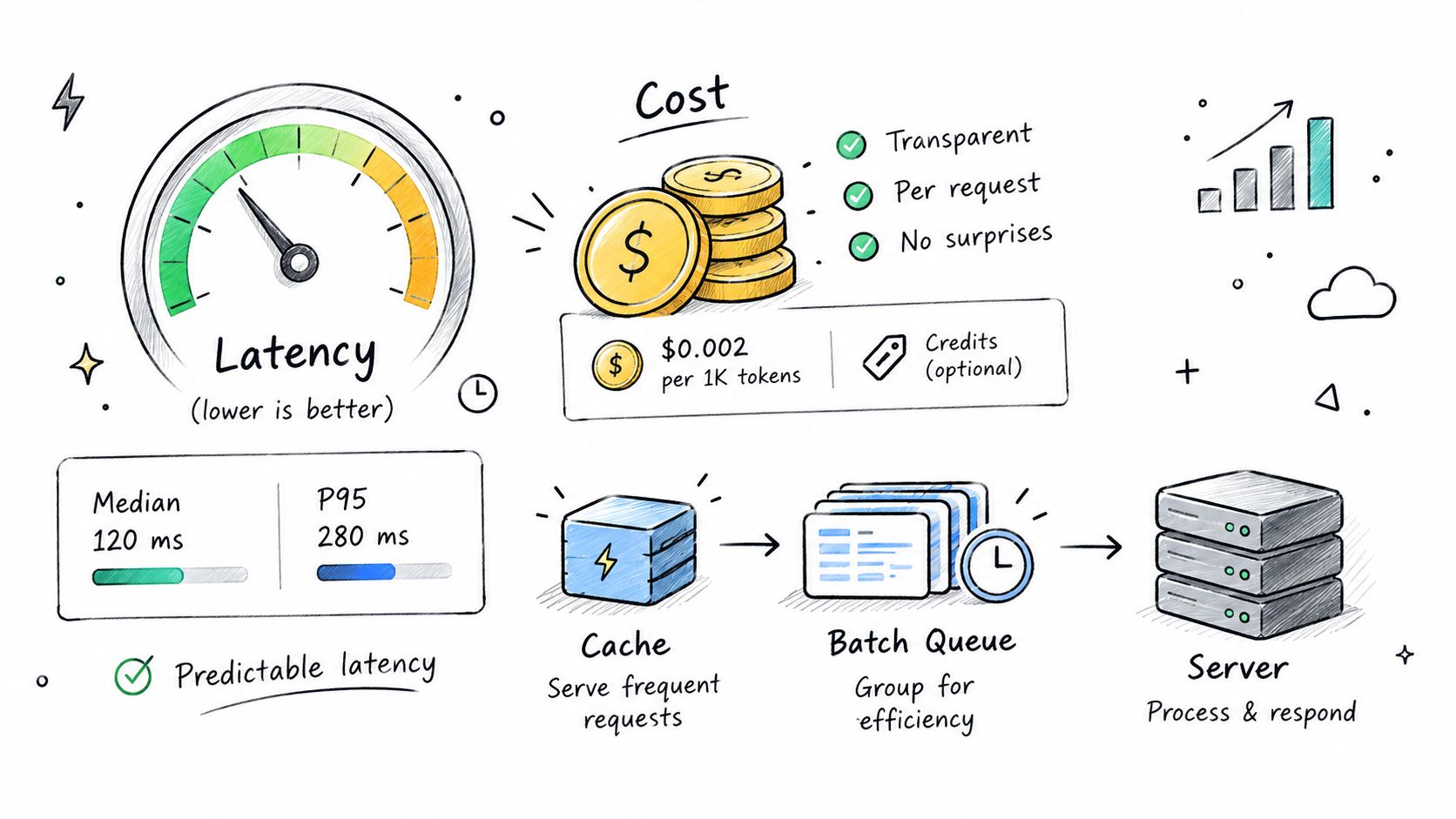
Once a JSON data API reaches production, response speed and spending become closely linked. A slow request can delay a user workflow, while uncontrolled retries can consume credits quickly. Fetchin reports median response times around one second and P95 performance below 1.5 seconds under load, giving teams a practical target for interactive features.
Measure Before You Upgrade
Treat latency like a restaurant queue. The average waiting time matters, but the longest waits often determine whether customers abandon the order. Track both median and P95 response times, alongside timeout rates, request volume, and successful data extraction.
Performance Benchmarks Reference
Typical latency metrics and pricing considerations for production integrations:
| Metric | Self-Serve Tier | Dedicated Capacity |
|---|---|---|
| Median response | Around 1 second | Around 1 second |
| P95 response | Below 1.5 seconds | Designed for sustained throughput |
| Rate limit | 5 requests per second | Up to 100 requests per second |
| Capacity model | Shared | Reserved |
These benchmarks give you a realistic baseline. Self-serve tiers work well for spiky or moderate usage patterns, while dedicated capacity pays off when consistent performance matters more than keeping costs variable.
Fetchin's self-serve plans support 5 requests per second, while dedicated capacity can reach 100 requests per second. Dedicated capacity is generally appropriate when steady traffic, strict latency targets, or large batch workloads make shared limits restrictive.
Optimize the request path first, then pay for additional capacity only when measured demand justifies it.
Reduce Unnecessary Requests
Credit-based pricing makes every avoidable call visible in your operating costs. Fetchin offers a free tier with 1,000 credits, monthly credits, pay-as-you-go options, and enterprise terms, so teams can match spending to usage instead of committing too early.
Use a short-lived cache for read-heavy screens, such as account research pages opened repeatedly by several users. Set freshness windows according to the feature: a few minutes for active sales workflows, longer for stable company attributes, and no cache when current page-state data is essential.
Batch background work whenever the product allows it. Queue company URLs overnight, group requests by priority, and reserve synchronous calls for user actions that genuinely need immediate results.
Monitor Consumption Continuously
A useful dashboard should show credit usage in real time, request volume by endpoint, cache-hit rates, latency percentiles, and failed calls. Fetchin's dashboard includes controls for credit volume, rate configuration, and live pricing visibility.
Failed requests should not consume quota. That policy prevents temporary provider or network errors from turning into unexpected overage charges, while clear alerts help teams identify a rising workload before it becomes a budget problem.
Before increasing capacity, set monthly spending thresholds, test realistic traffic, and review usage by feature. For sustained high throughput, Fetchin can provision dedicated capacity within 2 to 5 business days, giving engineering leaders time to plan the transition rather than reacting to a sudden limit.
Choosing a B2B data API isn't really about feature checklists. Think of it more like picking a delivery partner — what matters is whether records arrive fresh, whether the fields stay predictable, and whether anyone picks up the phone when production traffic spikes at 2 AM.
Compare Freshness and Coverage
Periodic indexing services will return a record quickly, sure — but that record might be a snapshot from weeks ago. A live provider pulls public professional data at the moment you request it, which means fewer stale titles, fewer outdated company details, and fewer enrichment matches that quietly fail.
Here's what to ask vendors before committing:
- How current are the responses? Don't take their word for it — ask for evidence on how recently profile and company records were updated.
- Which fields are actually covered? Fetchin's profile endpoint, for instance, returns 100+ attributes. The company endpoint covers industry, headcount, headquarters location, founding year, and verified domain.
- Is the schema stable? Push on field names, how nulls are handled, nested object structure, and what their versioning policy looks like.
- What happens when a value doesn't exist? Predictable empty fields are far less painful than undocumented format changes that break your integration on a Tuesday.
A solid approach is to run a batch of representative professional profile URLs and company URLs through a trial account. Compare completeness, freshness, and how much parsing work you'll actually need on your end. For a broader look at enrichment strategy, read this guide to data enrichment APIs.
Validate Production Readiness
Good documentation should cover authentication, real request examples, response schemas, rate limits, error responses, and migration notes. Pay attention to whether the provider offers asynchronous delivery for bulk jobs alongside synchronous responses for user-facing actions — you'll likely need both.
Before signing anything, confirm these five things:
- Reliability targets and incident communication — what uptime do they commit to, and how do they notify customers during outages?
- Rate limits and burst behavior — can you handle traffic spikes, or are there dedicated capacity options?
- Contract flexibility — look for monthly credit plans, pay-as-you-go pricing, and enterprise terms that scale.
- Compliance commitments — understand their data retention controls and where exactly their public-data sourcing stops.
- Roadmap visibility — new endpoints should support your product, not force a rewrite six months in.
The cheapest API is rarely the least expensive choice if weak schemas, stale records, or unresponsive support create a costly migration down the road.
One last thing: actually test how the API behaves under failure. Fetchin reports median response times near one second, P95 below 1.5 seconds, and — worth noting — no credit charge when a request fails. Start with a controlled pilot, write down clear acceptance criteria upfront, and pick the provider that fits where your workload is headed, not just where it is today.
Most production incidents don't start with a dramatic failure. They start small: a team asks for every field the API offers, skips the rate-limit headers, and treats a two-second timeout as if the data source has vanished. A JSON data API will forgive some of this. It won't forgive all of it. Defensive design is what keeps a Tuesday shortcut from becoming a Friday-night outage.
Request Only What You Need
Over-fetching feels harmless until you add up the costs. Bigger responses mean more parsing, more memory, more storage of data you'll never touch, and credits burned on fields nobody asked for. Pull what the feature actually needs — a current job title for lead scoring, say, or headcount for an account filter — and nothing more.
If the API supports field selection, use it. Then map whatever comes back into a narrow internal model of your own. When the provider eventually changes its payload (and it will), your application depends only on the small slice you control, so the change is far easier to absorb.
Treat every external response as untrusted input — even when the provider has an excellent track record.
Rate limits deserve the same care. Read the response headers, track how much capacity you have left, and keep interactive requests separate from batch jobs. A queue keeps a bulk import from starving user-facing traffic, and gradual concurrency is a courtesy to both your quota and the provider's infrastructure.
The tools around your workflow matter too. Testing JSON data APIs is far easier when the setup matches how your team actually works — this breakdown of Postman compared to other tools is a solid starting point.
Retry Carefully
Not every error deserves a second attempt. Temporary network hiccups and rate-limit responses? Worth retrying. Invalid input, expired credentials, or a record that simply doesn't exist? Retrying just repeats the failure and burns quota for nothing.
For the errors worth retrying, use exponential backoff with jitter. Wait briefly after the first failure, stretch the delay with each attempt, add a small random offset so concurrent clients don't sync up, and stop after a set number of tries. If the provider publishes its own retry guidance, follow that instead.
Validate the JSON structure before doing anything with it. Check that required objects exist, types match expectations, and nulls are handled the way your code assumes. Log validation failures with a request identifier — never by dumping sensitive fields into a log file.
Then plan for the day the schema changes, because it will. Accept unknown fields gracefully, version your own mappings, and set an alert for when a required field disappears or quietly changes type. Test with representative responses on a regular schedule, and a silent provider update stays a non-event instead of becoming an incident.
Fetchin helps teams build dependable real-time B2B workflows with structured JSON responses. Explore Fetchin and start with 1,000 free credits.